
No. An AI dental receptionist like Dentovox works through call forwarding on the phone line you already have. You keep your number, your carrier and your desk phones; the only change is a forwarding rule, switched on with your phone company, that sends some or all calls to the AI. Most practices forward only the calls nobody picks up.
By Viktoria Mols, CMO · Updated September 14, 2026 · 6 min read
For most practices, the phone system is the part of the office nobody wants to touch. It was set up years ago, the contract runs with a carrier, the desk phones work, and the one person who understood the phone tree may no longer be there. So the first question about any AI receptionist is rarely about the AI. It is: what do I have to rip out to use it?
For Dentovox, the answer is nothing. The AI does not replace your phone system and does not ask you to move your number to a new platform. It sits behind the line you already have, and your phone company decides which calls reach it.
Call forwarding is a setting on your phone line. When it is on, your carrier sends calls on to another number — here, the Dentovox number shown during setup — either every time or only under a condition you choose. The caller notices nothing: they dialed your practice, and your practice answered.
Because forwarding belongs to the line, only the line's account holder can switch it on. Dentovox cannot do it for you, and neither can any other vendor. In practice it takes a couple of minutes: a star code dialed on the practice line, or a single setting in a business VoIP admin portal.
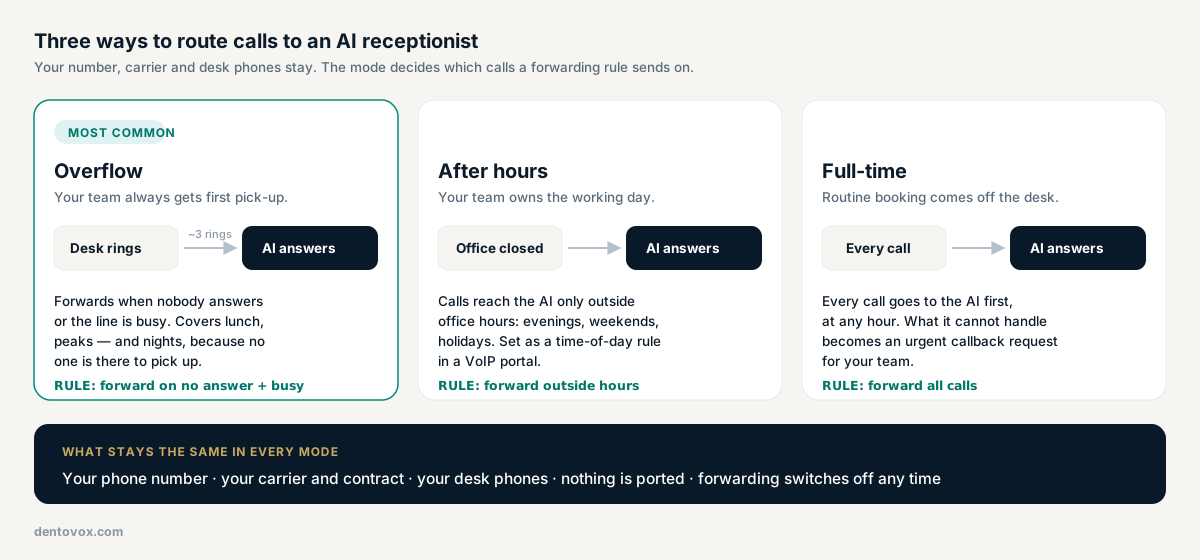
| Mode | What happens to a call | Forwarding rule | Good fit |
|---|---|---|---|
| Overflow | Desk rings first; forwards to the AI after about three rings with no answer, or when the line is busy | Forward on no answer + busy | Most practices — the team keeps first pick-up |
| After hours | Team answers during office hours; the AI answers evenings, weekends and holidays | Forward outside office hours | Desks that keep up all day but go dark at close |
| Full-time | Every call reaches the AI first, at any hour | Forward all calls | Practices that want routine booking off the desk entirely |
Two details are worth knowing before you pick. First, overflow quietly covers nights too. When the office is closed nobody is there to answer, so the no-answer rule sends those calls to the AI without any time-of-day schedule. That is why it is the mode most practices start with, and it matches the Overflow plan at $299 a month; full-time 24/7 answering is the Front Desk plan at $499.
Second, carriers count seconds, not rings. A ring is roughly six seconds, and many carriers enforce a minimum delay of around fourteen seconds before no-answer forwarding triggers. Ask for two rings and you may get closer to three. The ring count is adjustable in Dentovox, but the floor is the carrier's.
*72 followed by the number forwards all calls and *73 turns it off, while the no-answer code differs by carrier. On business VoIP (RingCentral, Vonage, 8x8, Comcast Business, Spectrum Business and similar) it is a Call Forwarding setting in the admin portal instead.Turning it off works the same way in reverse: the off code on your line, or remove the number in the portal. Calls go straight to your desk again.
Forwarding a call to the AI does not mean the call leaves your practice. Routine requests — booking, rescheduling, hours, directions — are handled on the call. What the AI should not handle comes back to your team as an urgent callback request in the dashboard, with the caller's number and the reason, so someone can follow up.
Emergencies are handled separately. When a caller describes symptoms like heavy bleeding, swelling or a knocked-out tooth, the booking flow is stopped by the system itself rather than left to the AI's judgment, and anyone describing a medical emergency is told to call 911. Dentovox is not an emergency service. How that works on a live call is on the AI receptionist page.
The phone and the schedule are separate connections, and neither waits on the other. Dentovox has scheduling built in from your business hours, so the AI can book from the first day. Connecting Dentrix, Open Dental or Eaglesoft through NexHealth typically takes one to two business days, because a sync has to be set up for your specific practice. Once it is, the AI reads your real openings and writes appointments into your existing calendar — see scheduling.
If you are still weighing an AI receptionist against a staffed answering service, AI vs answering service covers the trade-off, and after-hours dental answering covers which hours are actually uncovered.
If you are deciding whether to replace your phone system anyway — routing, caller ID, recording, texting and the 911 rules — see dental office phone systems: what to look for in 2026.
No. Patients keep dialing the number they already know. Your phone company forwards some or all of those calls to the AI, so the number, the carrier and the desk phones stay as they are, and nothing is ported.
No, and no vendor can. Forwarding is a setting on your phone line, so only the account holder can switch it on with the phone company. It usually takes a couple of minutes: a star code dialed on the practice line, or one setting in a business VoIP portal. Dentovox setup shows the steps for your carrier and the number to forward to.
Only if you choose full-time. In overflow mode, the one most practices start with, the desk phone rings first and the call forwards to the AI only when nobody answers after about three rings or the line is busy. In after-hours mode the AI takes calls only outside office hours.
Call the practice number from a mobile phone. In full-time mode the AI should answer; in overflow mode, let it ring out without picking up at the desk. If the AI answers, forwarding is live.
Turn forwarding off on your line. On many landlines that is *73; on business VoIP you remove the forwarding number in the admin portal. Calls go straight to your desk again and nothing else in your phone setup changes.
No. Landlines, business VoIP and mobile lines all support call forwarding. What differs is where it is set: a star code dialed on the line, or a Call Forwarding setting in the provider's admin portal. A time-of-day rule for after-hours-only forwarding is easiest on VoIP.
Star codes and forwarding options differ between carriers and plans; confirm the exact steps with your phone company. Dentovox is not an emergency service — in a medical or dental emergency, call 911.
Create an account free — no card — build your receptionist, and hear it handle a call on the spot. Your own number activates when you start a plan.