
A dental office phone system should do five things well: route calls so none ring out, show who is calling from the patient record, report missed calls by hour, record and text within the rules, and dial 911 directly. Features beyond that are nice to have. Before switching anything, check whether your current line can simply forward unanswered calls.
By Viktoria Mols, CMO · Published October 30, 2026 · 13 min read
The office manager has three browser tabs open, each a phone vendor promising to "never miss a call again." The quotes don't line up — one is per user, one per line, one includes texting and one charges for it — and the reason she started looking was simple: patients said they couldn't get through at lunch.
Most practices start shopping for a new phone system for that one reason: calls are being missed, and the current setup seems to be the problem. Sometimes it is. More often, the system they already have can do what they need — ring a second group when the first is busy, send calls somewhere useful after hours, show a report of what was missed — and nobody has set it up that way.
This guide is for the practice owner or office manager deciding what to buy, or whether to buy anything at all. It covers the features that matter for a dental office, the rules that apply to every system (some of which are federal law), the questions to ask a vendor, and the option most people skip: fixing the call flow before replacing the hardware.
Strip away the feature lists and a dental office needs five things from its phones.
| Setup | What it is | Good for | Watch out for |
|---|---|---|---|
| Carrier lines | Business lines from the phone or cable company, with basic desk phones. | Very small practices that mostly need a dial tone. | Limited routing and almost no reporting; forwarding is often set through the carrier. |
| On-site PBX | A phone system box in your office running your extensions. | Practices that already own one and have IT support. | Upgrades, maintenance and 911 compliance are your responsibility. |
| Hosted VoIP | The system runs in the provider's cloud; phones connect over your internet. | Flexible routing, apps, remote answering, multiple sites. | Call quality depends on your internet; plan a backup connection. |
| Dental-specific VoIP | Hosted VoIP built for dental offices, usually with PMS caller ID and texting. | Practices that want the patient record on screen with every call. | Bundles and contract terms; check what you're paying for that you won't use. |
None of these is automatically right. A two-dentist practice with a stable team and a clear call flow can do well on a basic system with good forwarding rules; a growing group with three locations will feel the lack of reporting and caller ID every day.
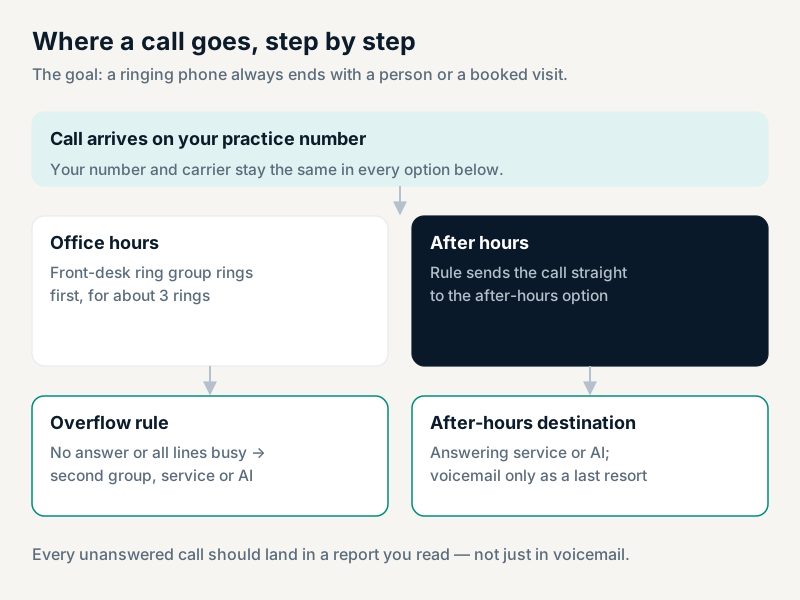
A ring group rings several phones at once or in order. An overflow rule says what happens when nobody in the group answers within a set number of rings, or when every line is busy — instead of voicemail, the call can go to a second group, a back-office phone, an answering service or an AI receptionist. Time-of-day routing switches the whole plan at lunch, after closing and on holidays. Ask any vendor to show you these three settings on screen; if it takes a support ticket to change them, that's a problem, because you will change them every holiday.
Many dental-focused phone systems read the caller's number, find the patient in Dentrix, Open Dental or Eaglesoft, and show a pop-up with their next appointment and balance. It is one of the few features that changes the feel of a call for the patient: being greeted by name, with the appointment already on screen. Check which practice management systems a vendor supports, and whether the link is read-only or can also write notes back.
The report you want shows every unanswered call, the hour it came in, whether the number called back, and whether it belongs to an existing patient. A daily answer-rate percentage is not enough on its own — an average of 71% can hide a lunch hour where nothing is answered. How to read a call log this way is shown step by step in a day of calls at a dental office.
Voicemail-to-email and transcription are useful, but they make voicemail a better last resort, not a substitute for answering. The greeting matters as much as the system — ten ready-to-record greetings are in dental office voicemail greetings, and what may be left in a message to a patient under HIPAA is in HIPAA on the phone.
Two-way texting from your main number lets patients confirm, reschedule and ask quick questions in writing. Text only patients who have agreed to receive texts, and keep a record of that agreement. Before a business can text patients from a local number, US carriers require registration under A2P 10DLC, or verification for a toll-free number; unregistered texts are filtered without warning. What that registration asks for is covered in A2P 10DLC for dental practices.
A staff app lets someone answer the practice line from a phone during a busy hour or a snow day. For groups, a single dashboard across locations matters more than any single feature. Both are useful; neither fixes missed calls on its own.
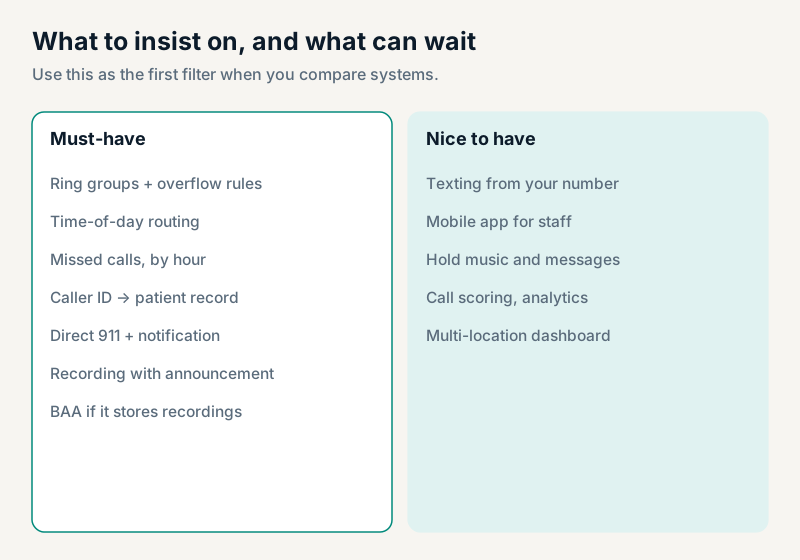
Kari's Law, enforced under FCC rules, requires multi-line telephone systems manufactured, imported, first sold or leased, or installed after February 16, 2020 to let anyone dial 911 directly — without pressing 9 or any other prefix first — and to notify someone on site or off site, such as the front desk, when a 911 call is made (FCC). Systems installed on or before that date are not covered by these rules, but if yours still needs a 9 before 911, it is worth fixing anyway. The same FCC rules, under RAY BAUM'S Act, require 911 calls from the system to carry a dispatchable location — the street address plus details like the suite or floor. Ask any vendor how their system meets both. If you want to test it, ask your local 911 center how they want test calls arranged — never place an unannounced test call.
Federal law and most states allow a call to be recorded with the consent of one party, but a group of states — including California, Florida, Illinois, Maryland, Massachusetts, Pennsylvania and Washington — require every party's consent. Because patients may call from anywhere, the practical answer is the same everywhere: announce recording at the start of every recorded call ("calls may be recorded for quality and training"). Ask your counsel about your state's specifics.
A phone company that only carries the call is generally not a business associate. A vendor that stores your call recordings, voicemails or transcripts — which contain patients' health information — generally is, and should sign a Business Associate Agreement before you go live. Ask for it in writing, and ask where recordings are stored and for how long. How the same question applies to AI receptionists is covered in is an AI receptionist HIPAA compliant?
Your practice number is yours. Under FCC number-portability rules you can generally take a local number with you when you change providers. Ask the new vendor to handle the port, don't cancel the old service until the port completes, and expect it to take days to a few weeks.
Quotes are hard to compare because vendors charge along different lines. Put every quote into the same five rows before comparing totals:
Then add the contract length and the cost of leaving early. A cheaper monthly price on a long contract with an early-termination fee is often the more expensive choice.
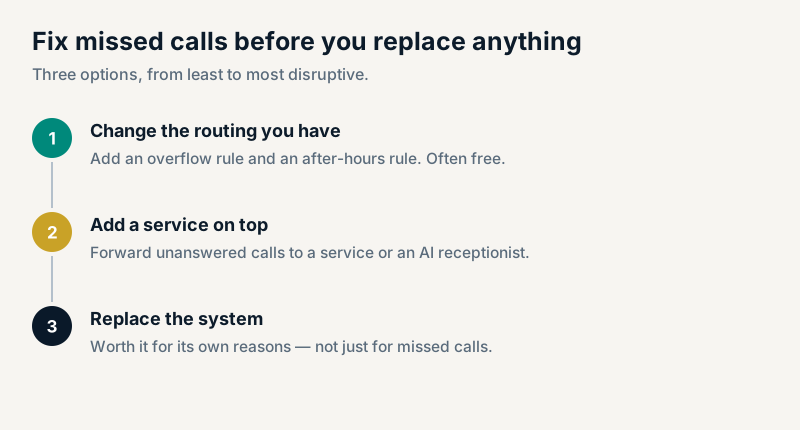
If the reason you are shopping is missed calls, try the least disruptive fix first. Most systems — even basic carrier lines — support conditional call forwarding: send the call somewhere else when it isn't answered, when the line is busy, or at certain hours. Setting that up takes minutes and costs little or nothing. Adding a service on top of forwarding — an answering service, or an AI receptionist that books into your schedule — covers lunch, the morning rush and after hours without touching your number, your carrier or your desk phones. How forwarding works with an AI receptionist specifically is explained in do you need a new phone system for an AI receptionist?
Replace the phone system when you need what only a new system provides — caller ID linked to your records, better reporting, texting from your number, multi-location management — and plan the switch for a quiet week, with the number port scheduled before the old contract ends.
Dentovox works with the phone system you have: your line forwards unanswered or after-hours calls, and the AI receptionist answers in English or Spanish and books into Dentrix, Open Dental or Eaglesoft during the call. Your number, carrier and desk phones stay as they are. Hear it on the demo line at (201) 690-2609.
There isn't one best system for every practice. Look for ring groups with overflow and time-of-day routing, caller ID linked to your practice software, a missed-call report by hour, direct 911 dialing, recording with an announcement, and a signed BAA if the vendor stores recordings. Then compare cost and contract terms.
Multi-line telephone systems manufactured, sold or installed after February 16, 2020 must, under Kari's Law and FCC rules, let users dial 911 without a prefix such as 9 and notify a central point, such as the front desk, when a 911 call is made.
Yes, with consent. Several states — including California, Florida, Illinois, Maryland, Massachusetts, Pennsylvania and Washington — require every party's consent, so announce recording at the start of every recorded call. A vendor that stores the recordings should sign a BAA.
Often not — forwarding unanswered and after-hours calls on the line you have fixes most missed calls. How that works is covered in do you need a new phone system for an AI receptionist?
Generally yes. Under FCC number-portability rules a business can usually move its local number to a new provider. Let the new provider manage the port, and keep the old service until the port is complete.
Create an account free — no card — build your receptionist, and hear it handle a call on the spot. Your own number activates when you start a plan.